Google Calendar AI Agent with Dynamic Scheduling
Version : 1.0.0
n8n Version : 1.88.0+
Author : Koresolucoes
License : MIT
Description
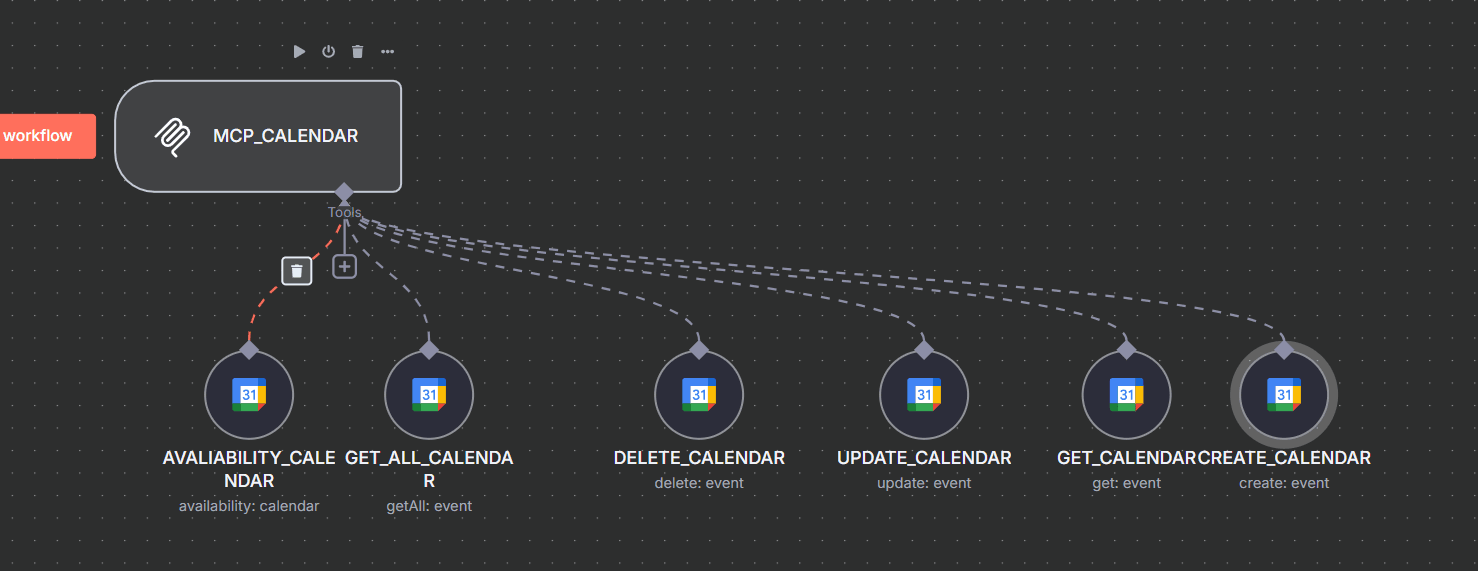
An AI-powered workflow to automate Google Calendar operations using dynamic parameters and MCP (Model Control Plane) integration. Enables event creation, availability checks, updates, and deletions with timezone-aware scheduling [[1]][[2]][[8]].
Key Features :
- đź“… Full Calendar CRUD : Create, read, update, and delete events in Google Calendar.
- ⏰ Availability Checks : Verify time slots using
AVALIABILITY_CALENDAR node with timezone support (eg, America/Sao_Paulo ).
- 🤖 AI-Driven Parameters : Use
$fromAI() to inject dynamic values ​​like Start_Time , End_Time , and Description [[3]][[4]].
- đź”— MCP Integration : Connects to an MCP server for centralized AI agent control [[5]][[6]].
Use Cases
-
Automated Scheduling : Book appointments based on AI-recommended time slots.
-
Meeting Coordination : Sync calendar events with CRM/task management systems.
-
Resource Management : Check room/equipment availability before event creation.
Instructions
1. Import Template
- Go to n8n > Templates > Import from File and upload this workflow.
2. Configure Credentials
- Add Google Calendar OAuth2 credentials under Settings > Credentials .
- Ensure the calendar ID matches your target (eg,
ODONTOLOGIA group calendar).
3. Set Up Dynamic Parameters
- Use
$fromAI('Parameter_Name') in nodes like CREATE_CALENDAR to inject AI-generated values ​​(eg, event descriptions).
4. Activate & Test
- Enable the workflow and send test requests to the webhook path
/mcp/:tool/calendar .
Tags
Google Calendar Automation MCP AI Agent Scheduling CRUD
Screenshots

License
This template is licensed under the MIT License.
Notes:
- Extend multi-tenancy by adding
:userId to the webhook path (eg, /mcp/:userId/calendar ) [[7]].
- For timezone accuracy, always specify
options.timezone in availability checks [[8]].
- Refer to n8n's Google Calendar docs for advanced field mappings.
