How it Works
Disclaimer: This template is for self-hosted n8n instances only.
This workflow is designed for developers, data analysts, and automation enthusiasts seeking to automate personalized news collection and delivery. It seamlessly combines n8n, OpenAI (eg, GPT-4.1), and Bright Data's Model Context Protocol (MCP) to collect, extract, and email the latest global news headlines.
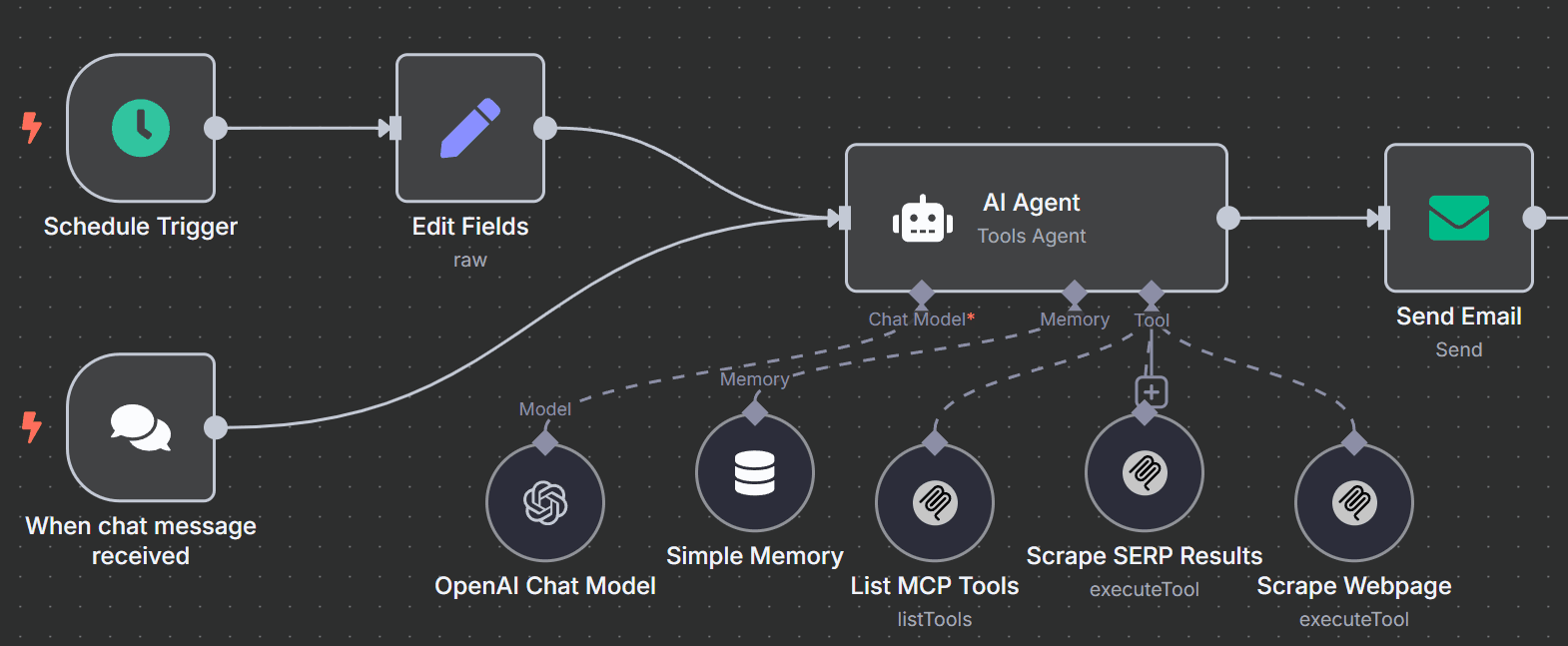
On a schedule or via a manual trigger, the workflow prompts an AI agent to gather fresh news. The agent leverages context-aware memory and integrated MCP tools to conduct both search engine queries and direct web page scraping in real time, delivering more than just meta search results—it extracts actual on-page headlines and trusted links. Results are formatted and delivered automatically by email via your SMTP provider, requiring zero manual effort once configured.
Who is this for?
- Developers, data engineers, or automation pros wanting an AI-powered, fully automated newsfeed
- Teams needing up-to-date news digests from trusted global sources
- Anyone self-hosting n8n who wants to combine advanced LLMs with real-time web data
Setup Steps
- Setup time: Approx. 15–30 minutes (n8n install, API configuration, node setup)
- Requirements:
- Self-hosted n8n instance
- OpenAI API key
- Bright Data MCP account credentials
- SMTP/email provider details
- Install the community MCP node (
n8n-nodes-mcp ) for n8n and set up Bright Data MCP access.
- Configure these nodes:
-
Schedule Trigger: For automated delivery at your chosen interval.
-
Edit Fields: To inject your AI news collection prompt.
-
AI Agent: Connects to OpenAI and MCP, enabled with memory for context.
-
OpenAI Chat Model: Connects via your OpenAI credentials.
-
MCP Clients: Configure at least two—one for search (eg
search_engine ) and one for scraping (eg scrape_as_markdown ).
-
Send Email: Set up with recipient and SMTP information.
- Credentials must be entered into their respective nodes for successful execution.
Customization Guidance
-
Prompt Tweaks: Refine your AI news prompt to target specific genres, regions, or sources, or broaden/narrow the coverage as needed.
-
Tool Configuration: Carefully define tool descriptions and parameters in MCP client nodes so the agent can pick the best tool for each step (eg, only scrape real news sites).
-
Delivery Settings: Adjust email recipient(s) and SMTP details as needed.
-
Workflow Enhancements: Use sticky notes in n8n for extended documentation, alternate prompts, or troubleshooting tips.
-
Run Frequency: Set schedule as needed—from hourly to daily updates.
Once configured, this workflow will automatically gather, extract, and email curated news headlines and links—no manual curation required!


