No Products in the Cart


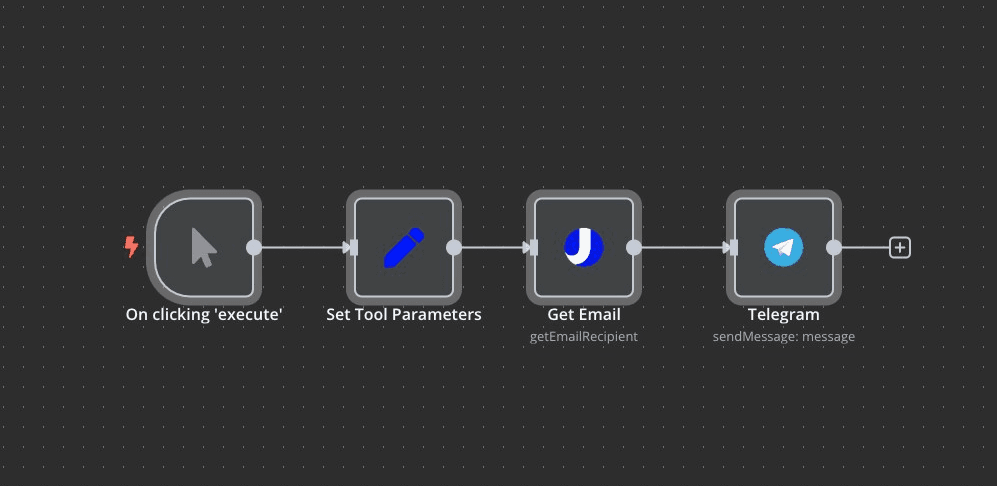
This n8n workflow template uses uProc's "Get Email by Domain, Firstname and Lastname" tool to discover a professional email address, and then sends that email to a Telegram channel .
⚠️ Note: You must set up your uProc credentials (Email + API Key) from the Integration settings before running this workflow.
Add uProc Credentials
Go to the uProc integration page and copy your email and API key .
Add them as credentials in your n8n instance.
Set Tool Parameters
firstname : First name of the personlastname : Last name of the persondomain : Their company domain Replace the Set Node (Optional)
You can dynamically fetch the firstname , lastname , and domain from other sources like:
Run the Workflow
Trigger the flow manually or integrate it with a larger automation.
uproc.io )language ): Last name of the personverify : Verifies email in real-time with mail serverguess : Guesses based on company format (eg, firstname.lastname@domain.com )email : Discovered email addressconfidence : Indicates if the result is verified or risky (eg, catch-all)score : Reliability score from 0 (unreliable) to 99 (highly reliable)After discovering the email, the result is sent to a specified Telegram channel with this format:
User Miquel Colomer has next email on uproc.io: contact@uproc.io (verified - 99)
Clicking the email allows you to send a message directly to the recipient.
Template created by Miquel Colomer and n8nhackers.com .
Need help customizing or deploying? Contact us for consulting and support.
