To view the n8n flow demo and copy the JSON you need to purchase our Bundle... don't worry, it's FREE

Go to the BUNDLE

Activate and deactivate workflows on schedule using native n8n API

How it works

This workflow will activate and deactivate a selected other workflow on schedule.

⚠️ Warning!
This approach won't work for trial users as it requires n8n API that is not available to trial users.
See https://docs.n8n.io/api/ for details.
Setup steps

  1. Adjust activation/deactivation schedule for your needs. Custom (cron) interval is a recommended approach.
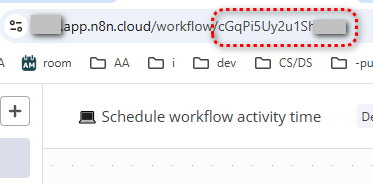
  2. Set targeted Workflow ID . You will find it in the URL of the workflow you want to manage.
    img
  3. Set n8n API credentials :
  • Create an API key: how to
  • Create n8n credentials using the API key: how to

This workflow uses n8n node .

#DevOps #workflow-management


Other useful stuff

Need a universal Error workflow to catch both execution and trigger errors ? Here you go:
Error handling: Send email via Gmail on execution or trigger-level errors

More stuff by Olek and do not forget to backup your workflows often by automating .

Do you want to automate your business?

Let's talk about your project