🎯 Precision Prospecting: Automate LinkedIn Lead Gen with n8n & Bright Data
📝 Overview
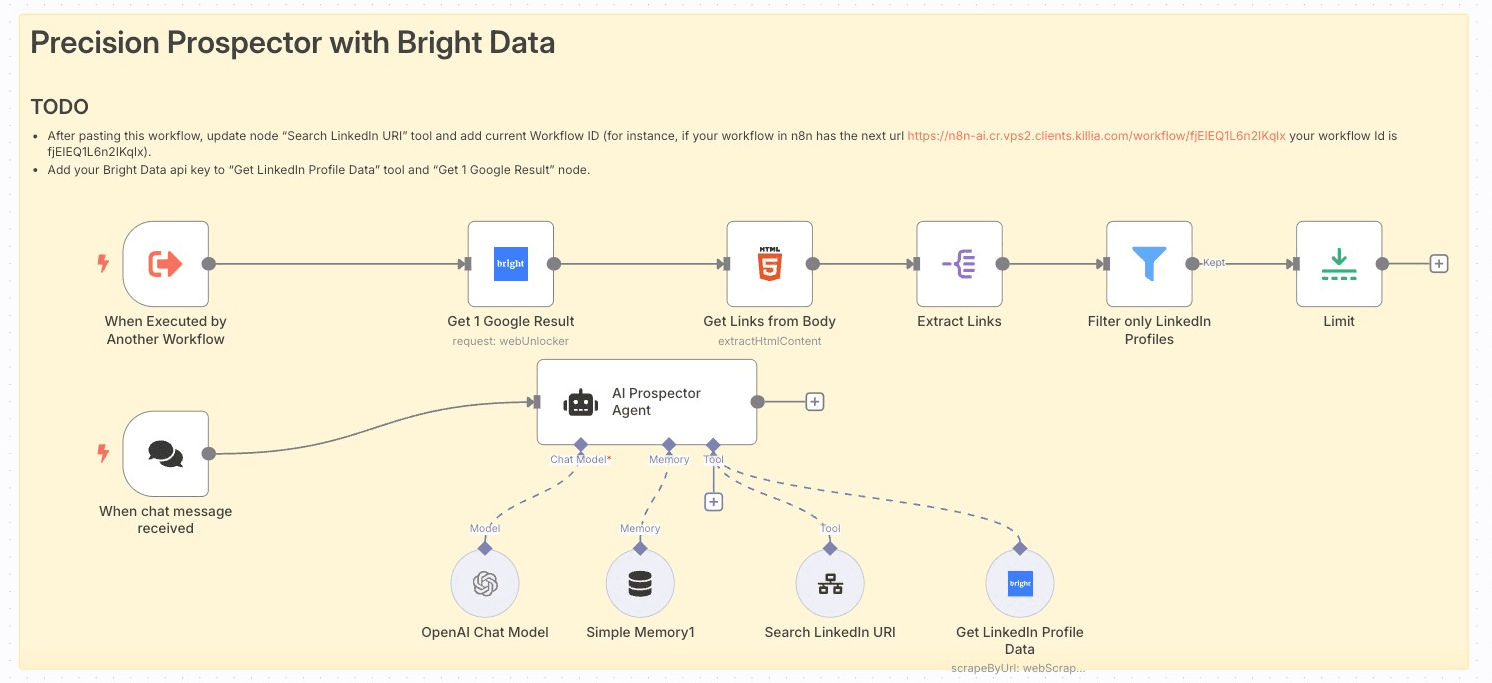
This workflow turns n8n into an AI-powered prospector, automatically searching Google for LinkedIn profiles, scraping profile data via Bright Data , and summarizing key details. Ideal for sales and recruitment teams seeking targeted lead lists without manual research.
🎥 Workflow in Action
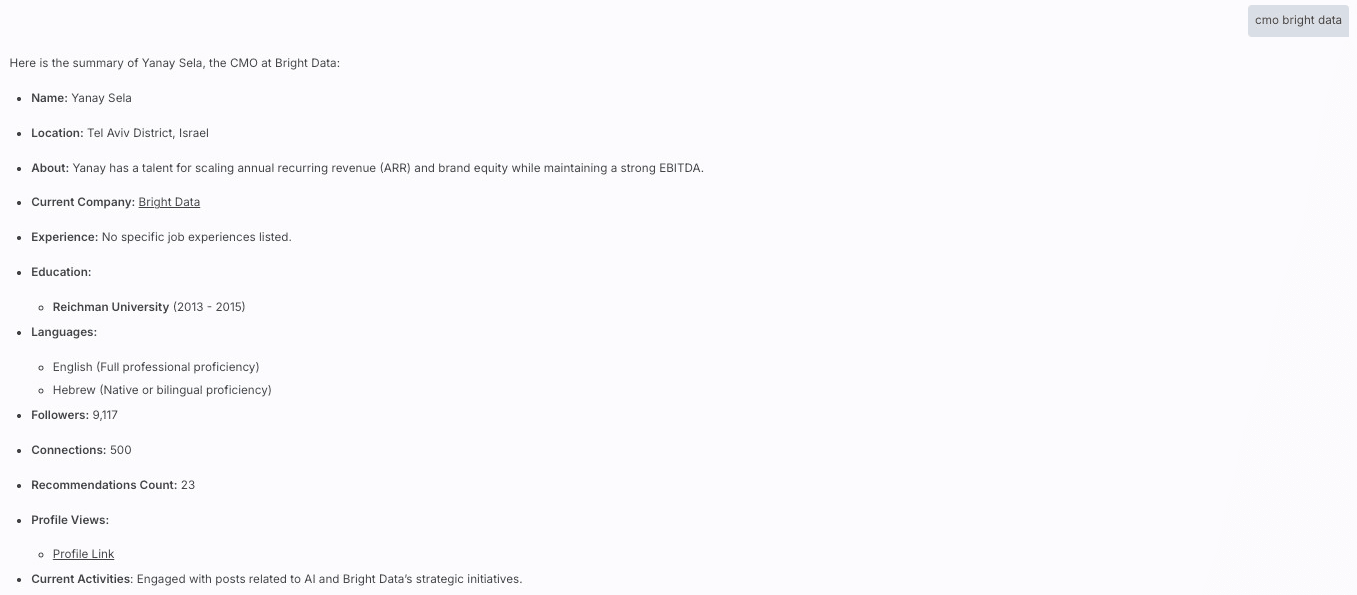
Want to see this workflow in action? You have a chat window output below:
🔑 Key Features
-
AI Chat Trigger : Start prospecting via conversational prompts.
-
Contextual Memory : Retains the last 20 messages for coherent dialogue.
-
Automated Google Search : Generates site-restricted queries and fetches the top result.
-
Bright Data Scraping : Synchronously scrapes LinkedIn profile details by URL.
-
Intelligent Filtering : Extracts only valid LinkedIn profile links.
-
Limit Control : Returns a single, most relevant profile per request.
-
LLM Summary : Uses GPT-4o-mini to interpret and present scraped data.
🚀 How It Works (Step-by-Step)
-
Prerequisites :
- n8n ≥ v1.0 with community nodes: install
n8n-nodes-brightdata (not verified community node).
- API credentials: OpenAI, Bright Data (web unlocker zone “web_unlocker1”).
- Webhook endpoint for chat triggers.
-
Node Configuration :
-
When chat message received (
chatTrigger ): Fires on user prompt.
-
Simple Memory1 (
memoryBufferWindow ): Stores the last 20 chat messages.
-
AI Prospector Agent (
agent ): Orchestrates search logic.
-
Get 1 Google Result (
brightData ): Performs a Google search with site:linkedin.com/in .
-
Get Links from Body (
html ): Extracts all <a> hrefs from the search result page.
-
Extract Links (
splitOut ): Splits out individual link entries.
-
Filter only LinkedIn Profiles (
filter ): Ensures the URL contains “ linkedin.com/” and starts with “https://”.
-
Limit (
limit ): Restricts output to the first valid profile URL.
-
Search LinkedIn URI (
toolWorkflow ): Passes the URL to a secondary workflow to fetch the first link.
-
Get LinkedIn Profile Data (
brightDataTool ): Scrapes the profile JSON.
-
OpenAI Chat Model (
lmChatOpenAi ): Summarizes and formats the scraped data.
-
Workflow Logic :
- User asks for a person by company & name, company & position, or LinkedIn URL.
- Agent builds a Google query (eg,
site:linkedin.com/in bright data cmo ) and calls “Get 1 Google Result.”
- Extracted links are filtered and limited to the top valid profile.
- If user provided a direct LinkedIn URL, Agent skips search and scrapes immediately.
- Scraped profile JSON is passed to GPT-4o-mini to generate a concise summary.
-
Testing & Optimization :
- Trigger via Execute Workflow for dry runs.
- Inspect intermediate node outputs in n8n's Execution panel.
- Adjust
maxIterations or memory window length for performance.
- Tune Bright Data zone or country settings to optimize scraping speed.
-
Deployment & Monitoring :
- Activate the workflow and expose its webhook URL.
- Use n8n's built-in Alerts or external monitoring (eg, Slack notifications) on failures.
- Rotate credentials via n8n's Credential Vault when needed.
- Version-control workflow via duplicates or Git-backed n8n instances.
✅ Prerequisites
-
OpenAI Account : API key for GPT-4o-mini.
-
Bright Data Account : Zone “web_unlocker1” and dataset
gd_l1viktl72bvl7bjuj0 .
-
n8n Version : v1.0+ with community nodes installed.
-
Permissions : Webhook access, Credential Vault read/write.
👤 Who Is This For?
- Sales teams automating outbound LinkedIn prospecting.
- Recruiters sourcing candidates without manual scraping.
- Marketing ops looking to enrich CRM with accurate profile data.
📈 Benefits & Use Cases
-
Efficiency : Reduces hours of manual search and data entry to seconds.
-
Accuracy : Filters out non-LinkedIn links and ensures high-quality results.
-
Scalability : Handle multiple prospect requests concurrently via chat or API.
-
Integration : Easily hook into CRMs or email sequencers downstream.
Workflow created and verified by Miquel Colomer https://www.linkedin.com/in/miquelcolomersalas/ and N8nHackers https://n8nhackers.com


