To view the n8n flow demo and copy the JSON you need to purchase our Bundle... don't worry, it's FREE

Go to the BUNDLE

♻️AI Multi-Stop Planner for Circular Logistics with GPT-4o & Open Route API

Tags : AI Agent, Supply Chain, Logistics, Circular Economy, Route Planning, Transportation, GPS API

Context

Hi! I'm Samir — a Supply Chain Engineer and Data Scientist based in Paris, and founder of LogiGreen Consulting .

Help logistics teams reduce operational workload and errors by combining AI automation , route optimization APIs , and workflow automation .

This workflow is part of a circular economy project , where stores return reusable packaging (bins, crates, containers) to a central warehouse.

Let's circular economies with AI-powered automation using n8n!

📬 For business inquiries, you can add find me on LinkedIn

Who is this template for?

This workflow is designed for logistics teams participating in circular economy loops .

Let us imagine your transportation company receives this pickup request :
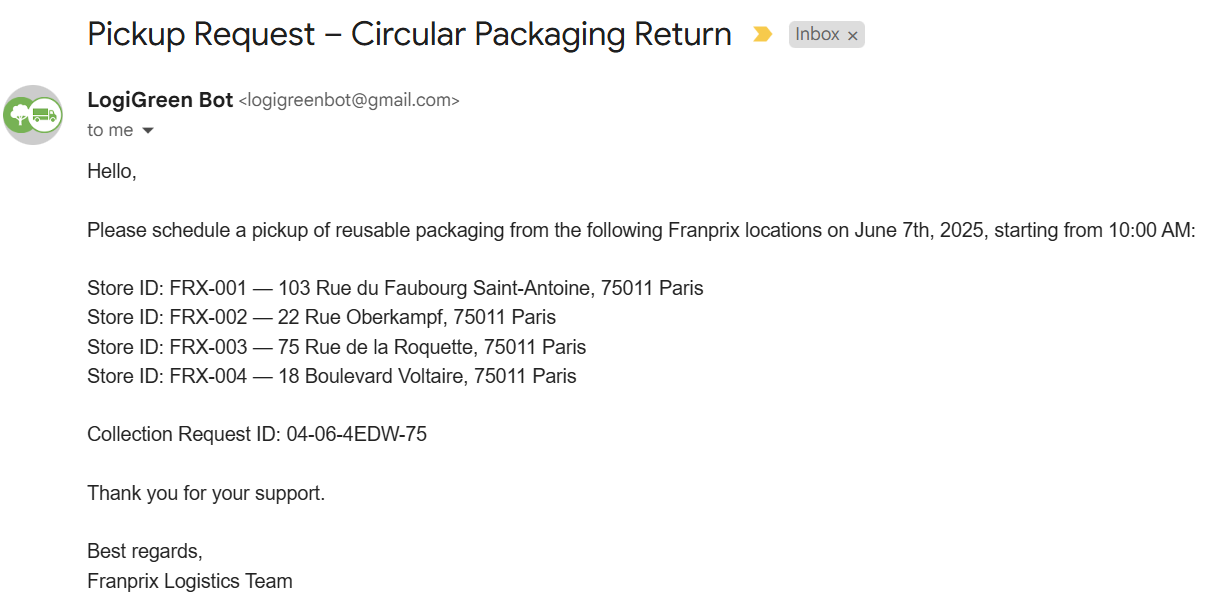
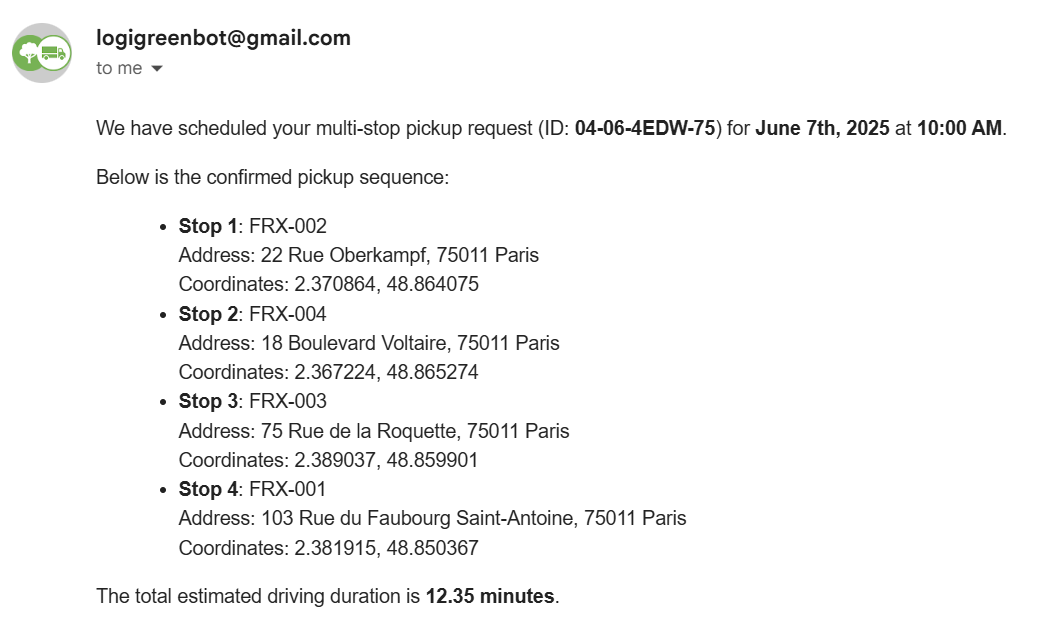
Example of Results

The two AI Agent nodes connected to Openroute Service API will process the information and respond with the detailed route plan .
Workflow

The results include driving time and the optimal sequence of stops generated by the multi-stop optimization endpoint of the API.

How does it work?

This workflow automates the end-to-end processing of multi-stop pickup requests for reusable packaging :
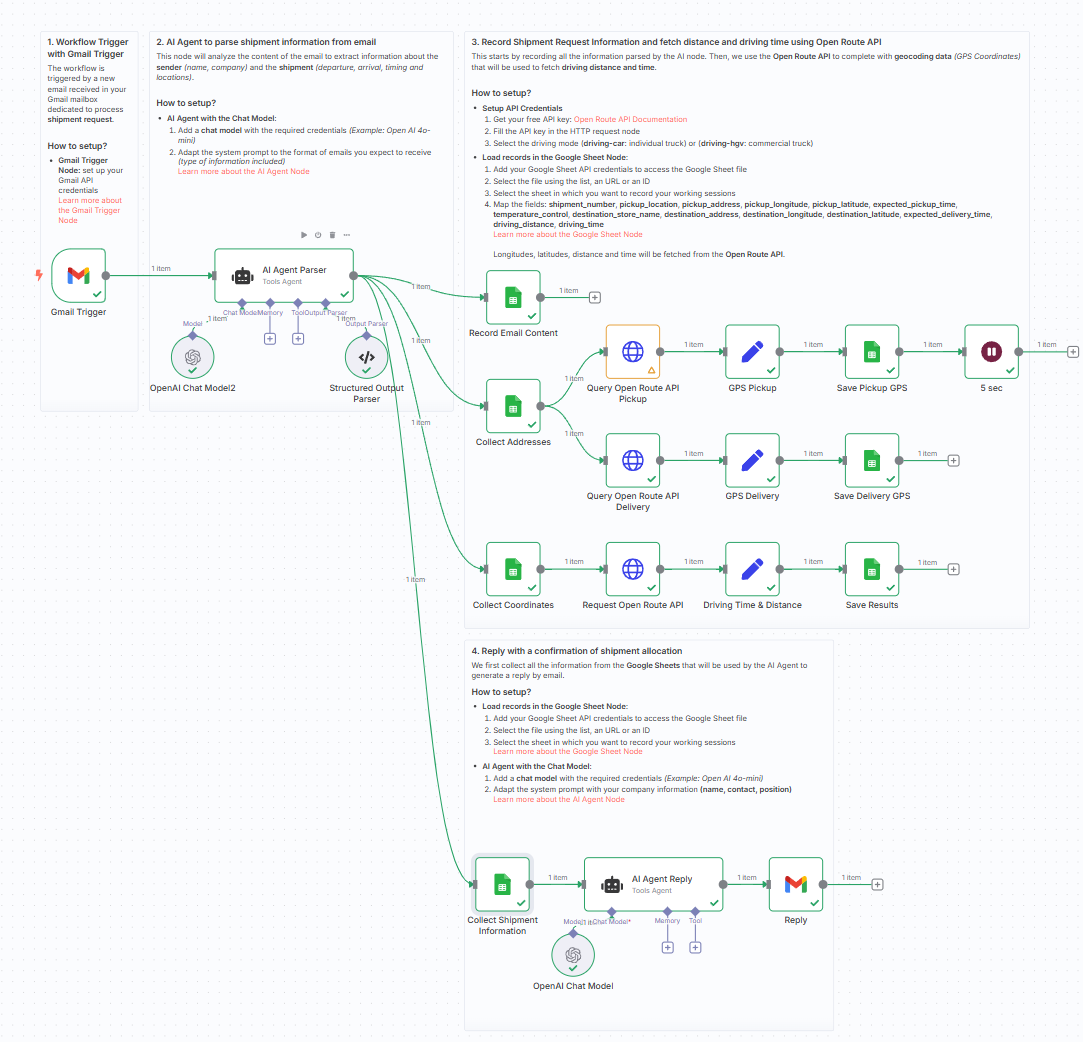
  • 📨 Gmail Trigger listens for collection request emails
  • 🧠 AI Agent parses the email into structured data (store ID, address, date)
  • 📍 Each stop is geocoded into GPS coordinates
  • 🗺️ OpenRouteService optimizes the stop sequence using truck-specific routing
  • 📄 A second AI Agent formats a confirmation email in HTML with the ordered pickup plan
  • 📧 The reply is sent back with all details including duration and route

Steps:

  1. 💌 Trigger on a new Gmail message
  2. 🧠 Extract data using AI Agent (eg, stores, addresses, times)
  3. 📑 Store raw and processed data in Google Sheets
  4. 📍 Enrich with GPS coordinates
  5. 🚚 Optimize route using OpenRouteService (truck profile)
  6. 📄 Format the confirmation using an AI Agent
  7. 📬 Send reply to requester with route and timing

workflow

What do I need to get started?

You'll need:

  • A Gmail account to receive collection requests
  • A Google Sheet to store and review data
  • A free OpenRouteService API key
  • Access to OpenAI for using AI Agent nodes
  • Sample pickup request emails to test

Next Steps

🗒️ Use the sticky notes inside the n8n canvas to:

  • Plug in your Gmail and OpenRouteService credentials
  • Try with a sample store collection email
  • Validate the confirmation format and route accuracy

This template was built using n8n v1.93.0
Submitted: June 7, 2025

Do you want to automate your business?

Let's talk about your project
