Salesforce to S3 File Migration & Cleanup
Automate archiving old Salesforce files to Amazon S3, log them back in Salesforce, and free up org storage — all from a scheduled n8n workflow.
🔧 How It Works (High-Level)
-
Schedule Trigger kicks off (e.g., daily).
-
Query Salesforce for
ContentDocument records older than 365 days.
-
Loop Each File → download binary via REST.
-
Upload to S3 with the original filename.
-
Lookup Links (
ContentDocumentLink) to keep the parent record reference.
-
Filter Out Users (ignore
LinkedEntityId starting with 005).
-
Create
S3_File__c record in Salesforce for traceability.
-
Delete Original File from Salesforce to reclaim storage.
-
Notify via Slack when the batch is done.
🚀 Set Up Steps (Time: ~45–90 mins)
-
Import n8n Workflow JSON and wire up credentials (Salesforce OAuth2, AWS S3, Slack).
-
Install Salesforce Unmanaged Package (Custom Object
S3_File__c, Apex controller, LWC, settings).
-
Fill
S3Settings__c (bucket, region, keys, expiry) or swap to Named Credentials.
-
Test with a Sandbox Batch (e.g., small date range) and verify upload/delete.
-
Schedule & Monitor (tweak interval, Slack channel).
💖 Why you’ll love it
- 💸 Slash storage costs — offload gigabytes to S3
- 🔍 Full traceability — every file still tracked in Salesforce
- 🧰 Plug & play — import JSON, install package, plug in creds
- 🧱 Modular & extensible — swap S3, add approvals, build an uploader UI
- ⏱ Set it & forget it — scheduled automation + Slack alerts
📦 What’s Included
-
n8n JSON Flow – ready to import.
-
Salesforce Unmanaged Package – Apex (
S3FilesController.cls), LWC (s3FilesViewer), S3_File__c, S3Settings__c.
-
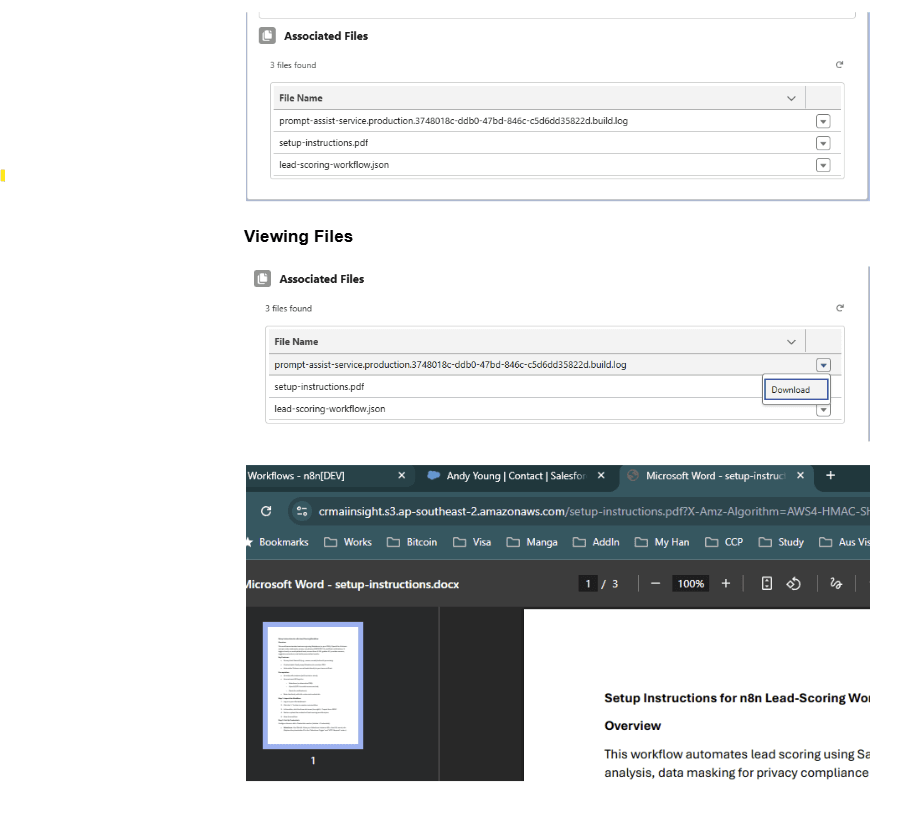
S3 + Salesforce Setup Guide – quick reference for configuring keys, permissions, and the LWC.
All components are editable — extend, replace, or integrate with your own processes.
🧱 Requirements
- n8n instance (self-hosted or Cloud) with HTTP Request, AWS S3, Slack, and Salesforce nodes.
- Salesforce org with API access & permission to install unmanaged packages.
- You have to have Query All Files permission. Setup-> Permission Sets / Profile -> App Permission -> Content -> Query All Files. Allows View All Data users to SOQL query all files in the org.
- AWS S3 bucket + IAM user/role with
GetObject/PutObject (and optional ListBucket).


