Per visualizzare la demo del flow n8n e copiare il JSON devi acquistare il nostro Bundle... tranquillo è GRATIS

VAI AL BUNDLE

Generate Images with GPT-image-1 and Store in Google Drive with Cost Tracking

How it works

  • Receive a chat input as an image prompt.
  • Call OpenAI's gpt-image-1 API to generate an image.
  • Split the returned images and process them one by one.
  • Upload each generated image to Google Drive.
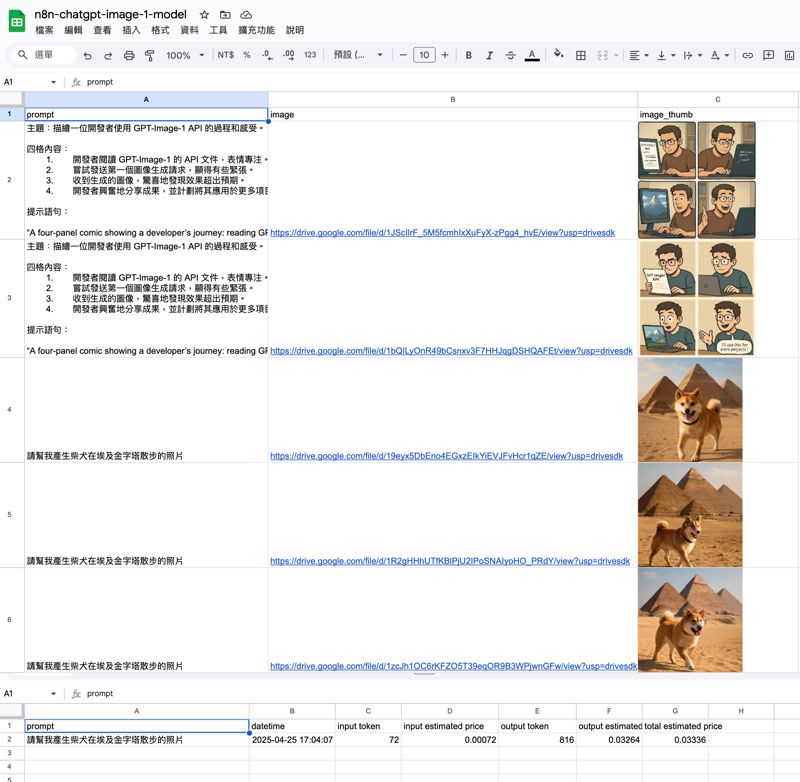
  • Save image links and thumbnails to a Google Sheets document.
  • Record token usage and estimated cost into a separate sheet.

Set up steps

  1. Connect your OpenAI API credentials for image generation.
  2. Connect your Google Drive and Google Sheets accounts.
  3. Set the destination folder in Google Drive.
  4. Set the target Google Sheet and specify the correct sheet tabs.
  5. The setup usually takes around 5-10 minutes.
  6. Detailed field mappings are already pre-configured inside the workflow.
  7. Additional tips and instructions are included as sticky notes inside the workflow.

Screenshot_20250425_190410_NRnD1vZE2x 2.jpg

Google Sheet copy url

Copy Sheet Link

Do you want to automate your business?

Let's talk about your project