POV Video Creator: Automating TikTok-Style Instagram Video Automation, Approval, and Multi-Platform Posting Using AI, ElevenLabs, Google Sheets, and Social Media APIs
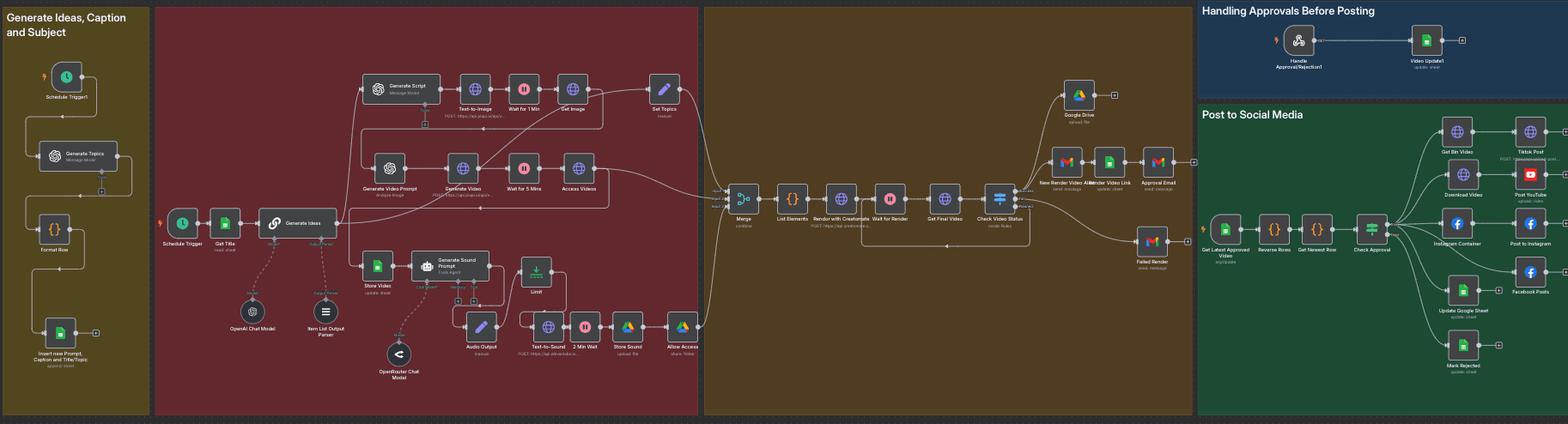
Description
What Problem Does This Solve? 🎥
This workflow automates the creation, rendering, approval, and posting of TikTok-style POV (Point of View) videos to Instagram, with cross-posting to Facebook and YouTube. It eliminates manual video production, approval delays, and inconsistent posting schedules. It ensures high-quality content creation and distribution for social media managers and content creators
Target audience: Social media managers, content creators, small to medium-sized businesses, and n8n users familiar with AI tools, Google Sheets, and social media APIs
What Does It Do? 🌟
- Generates daily POV video ideas using OpenAI
- Creates images, videos, and audio with PIAPI.ai and ElevenLabs
- Renders final videos with Creatomate
- Manages approvals via email and Google Sheets
- Posts approved videos to Instagram, Facebook, and YouTube
- Tracks progress in a Google Sheet for transparency
Key Features
- AI-driven idea generation and script creation
- Automated media production with image, video, and audio synthesis
- Email-based approval system for quality control
- Cross-platform posting to Instagram, Facebook, and YouTube
- Real-time tracking in Google Sheets and Google Drive
- Error handling for rendering and posting failures
Setup Instructions
Prerequisites
-
n8n Instance: Self-hosted or cloud n8n instance
-
API Credentials:
-
OpenAI API: API key for idea generation, stored in n8n credentials
-
PIAPI.ai API: API key for image and video generation, stored in n8n credentials
-
ElevenLabs API: API key for audio generation, stored in n8n credentials
-
Creatomate API: API key for video rendering, stored in n8n credentials
-
Google Sheets/Drive API: OAuth2 credentials from Google Cloud Console with Sheets and Drive scopes
-
Gmail API: OAuth2 credentials from Google Cloud Console with Gmail scope
-
Instagram Graph API: User Access Token with
instagram_content_publish permission from a Facebook App
-
Facebook Graph API: Access Token from the same Facebook App
-
YouTube API: OAuth2 credentials for YouTube uploads
-
Google Sheet: A sheet named "POV Videos" with a tab "Instagram" and columns:
Timestamp, ID, Subject, Topic, Caption, POV_Status, Prompt, Publish_Status, Link, Final Video, Approval, row_number
-
Creatomate Template: A pre-configured template with video, audio, and text elements
Installation Steps
-
Import the Workflow:
- Copy the workflow JSON from the “Template Code” section (to be provided)
- Import it into n8n via “Import from File” or “Import from URL”
-
Configure Credentials:
- Add API credentials in n8n’s Credentials section for OpenAI, PIAPI.ai, ElevenLabs, Creatomate, Google Sheets/Drive, Gmail, Instagram Graph, Facebook Graph, and YouTube
- Assign credentials to respective nodes. For example:
- In "Text-to-Image", use PIAPI.ai credentials:
{{ $credentials.PIAPI }}
- In "Render with Creatomate", use Creatomate credentials:
{{ $credentials.Creatomate }}
- In "Send Approval Request", use Gmail credentials
-
Set Up Nodes:
-
Schedule Trigger: Configure to run daily
-
Approval Email (Send Approval Request): Customize the HTML email template with approval/rejection links
-
Post to Social Media Nodes (Instagram Container, Facebook Posts, Post YouTube): Configure with your Instagram Business Account ID, Facebook Page ID, and YouTube channel details
-
Configure Google Sheet and Drive:
- Create "POV Videos" Google Sheet with "Instagram" tab and specified columns
- Share the sheet with your Google Sheets credential email
- Create "Audio" and "Video" folders in Google Drive, noting their IDs
-
Test the Workflow:
- Run manually to verify idea generation, media creation, and posting
- Check email notifications, Google Sheet updates, and social media posts
-
Schedule the Workflow:
- Enable "Schedule Trigger" and "Schedule Trigger1" for daily runs
- Enable "Get Latest Approved Video" to poll at 7 PM daily
How It Works
High-Level Steps
-
Generate Video Ideas: Creates daily POV video concepts with OpenAI
-
Create Media: Produces images, videos, and audio using AI tools
-
Render Video: Combines media into a final video with Creatomate
-
Manage Approvals: Sends approval emails and processes decisions
-
Post to Platforms: Publishes approved videos to Instagram, Facebook, and YouTube
Detailed Descriptions
Detailed node descriptions are available in the sticky notes within the workflow (to be provided). Below is a summary of key actions
Node Names and Actions
Video Idea Generation and Script Creation
-
Schedule Trigger: Initiates daily workflow
-
Get Title: Fetches pending video ideas from Google Sheet
-
Generate Topics: Uses OpenAI to create a new video idea
-
Format Row: Structures the idea into a Google Sheet row
-
Insert new Prompt, Caption and Title/Topic: Adds the idea to Google Sheet
-
Generate Ideas: Produces 3 POV sequences
-
Generate Script: Expands a sequence into a detailed script
-
Set Topics: Stores the script for media creation
Media Creation
-
Text-to-Image: Generates an image with PIAPI.ai
-
Get Image: Retrieves the generated image
-
Generate Video Prompt: Creates a video prompt from the image
-
Generate Video: Produces a 5-second video with PIAPI.ai
-
Access Videos: Retrieves the video URL
-
Store Video: Updates Google Sheet with video URL
-
Generate Sound Prompt: Creates an audio prompt
-
Text-to-Sound: Generates a 20-second audio clip with ElevenLabs
-
Store Sound: Uploads audio to Google Drive
-
Allow Access: Sets audio file permissions
Video Rendering
-
Merge: Combines script, video, and audio data
-
List Elements: Formats data for Creatomate
-
Render with Creatomate: Renders the final video
-
Check Video Status: Routes based on render success/failure
Storage and Notification
-
Google Drive: Uploads the rendered video
-
New Render Video Alert: Sends success email
-
Failed Render: Sends failure email
-
Render Video Link: Updates Google Sheet with final video URL
Approval Process
-
Approval Email: Sends approval request email
-
Handle Approval/Rejection1: Processes approval/rejection via webhook
-
Video Update1: Updates Google Sheet with approval status
Social Media Posting
-
Get Latest Approved Video: Polls for approved videos
-
Check Approval: Routes based on approval status
-
Instagram Container: Creates Instagram media container
-
Post to Instagram: Publishes to Instagram
-
Facebook Posts: Posts to Facebook
-
Download Video: Downloads video for YouTube
-
Post YouTube: Uploads to YouTube
-
Mark Rejected: Updates status for rejected videos
-
Update Google Sheet: Updates publish status
Customization Tips
-
Expand Platforms: Add nodes to post to other platforms
-
Modify Approval Email: Update the Send Approval Request node to customize the HTML template
-
Alternative Notifications: Add nodes for Slack or Telegram alerts
-
Adjust Video Duration: Modify Generate Video node to change duration (default: 5 seconds)


