WP Category Toolkit automates mapping content topics to your WordPress category IDs using your WordPress REST API and a GPT-5mini model.
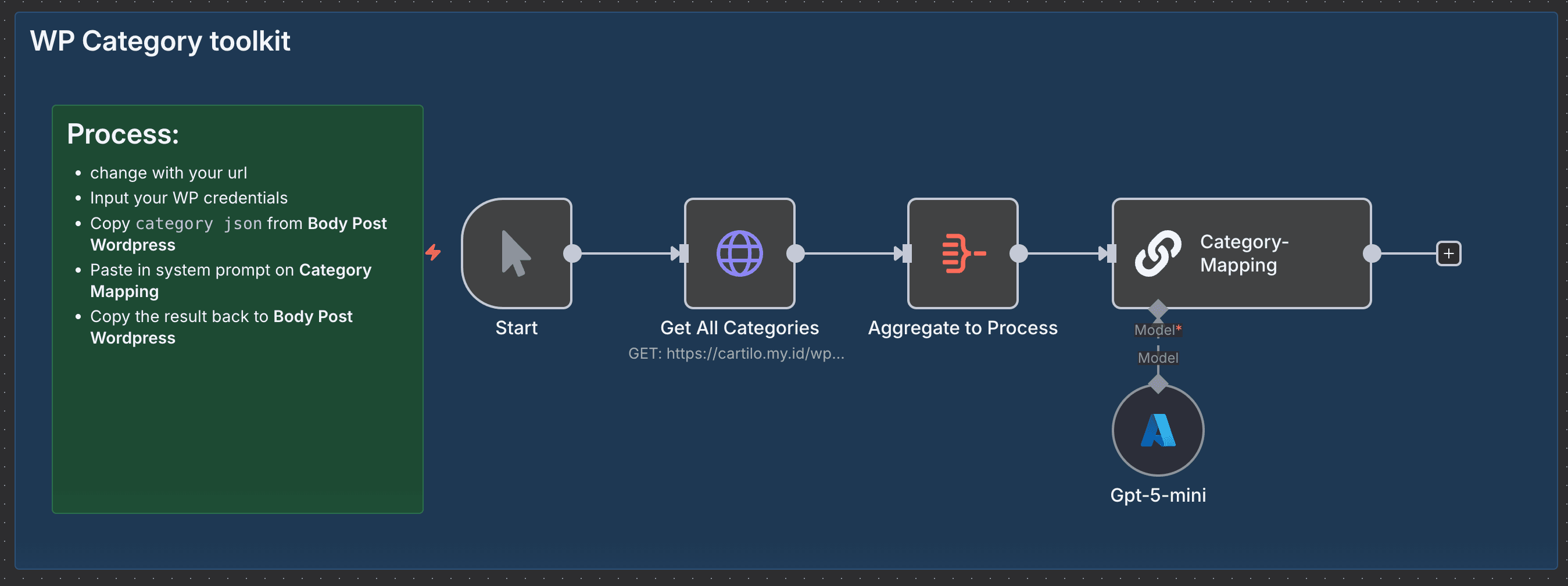
It replaces manual copy-paste and guesswork when assigning categories, speeds up publishing, and reduces tagging errors so your site stays organized and search friendly without you learning new dev magic (just a bit of prompt craft).
💡 Why Use WP Category Toolkit?
-
Saves time: Cuts hours of manual category lookup and mapping—deploy batches of posts in minutes, not coffee breaks.
-
Stops messy tagging: Eliminates inconsistent category assignments so your archive and SEO behave themselves.
-
Measurable improvement: Expect faster publish cycles and fewer category fixes (reduce manual mapping errors by ~90%).
-
Competitive edge: Uses an LLM to interpret topic intent, so your categories align with content meaning, not guesswork—like having a librarian who understands your jokes.
⚡ Perfect For
-
Content Managers: Keep large WordPress catalogs neat without the spreadsheet gymnastics.
-
Agencies: Onboard client sites faster by automating taxonomy mapping across projects.
-
Developers & Automators: Add an LLM-powered mapping step to content pipelines without building custom classifiers.
🔧 How It Works
-
⏱ Trigger: Manual start (kick it off when you’re ready to map categories).
-
📎 Process: Pull all site categories from your WordPress REST endpoint, aggregate the list, and feed the source content + current topic into the mapping step.
-
🤖 Smart Logic: A Chain LLM node (Category-Mapping) uses a small prompt to decide which WordPress category IDs match the content topic (GPT5-mini handles the reasoning).
-
💌 Output: A clean category ID mapping you can paste into your Body Post WordPress node or use to patch posts automatically.
🔐 Quick Setup
-
Import JSON file to your n8n instances → n8n Import Link
-
Add credentials: WordPress API credential & Azure OpenAI (GPT5-mini) credential or you can use usual open AI node
-
Update: Replace the WP endpoint URLand any post-body endpoints you’ll write back to
-
Test: Run with a sample post and copy the output mapping into your Body Post WordPress node to confirm IDs match expected categories
🧩 You'll Need
- Active n8n instances → n8n Partner Link
- WordPress REST API access and credentials (
wp-json access)
- Azure OpenAI account with access to GPT5-mini
- Integrations: WordPress API node, Chain LLM / Azure OpenAI node
-
(Optional) Staging WordPress site to test mappings safely
🛠️ Level Up Ideas
- Auto-write category descriptions based on mapped content using the LLM. (It’ll sound smarter than your coffee.)
- Patch posts automatically after mapping so mapping becomes truly zero-touch.
- Add fallback heuristics: if the LLM is uncertain, route to a Slack/Microsoft Teams approval step.
Made by: Khairul
Tags: WordPress, Categories, AI, n8n
Category: WordPress
Need custom work? Contact me


