📝 Overview
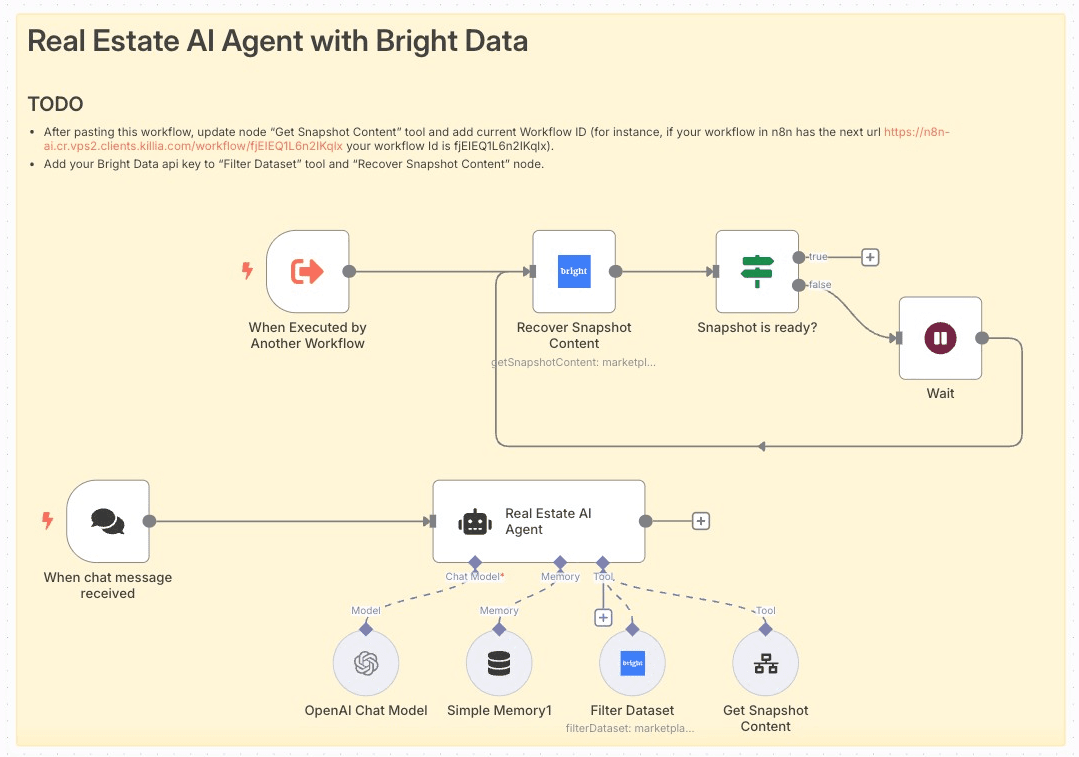
This workflow transforms n8n into a smart real-estate concierge by combining an AI chat interface with Bright Data’s marketplace datasets. Users interact via chat to specify city, price, bedrooms, and bathrooms—and receive a curated list of three homes for sale, complete with images and briefings.
🎥 Workflow in Action
Want to see this workflow in action? Play the video
🔑 Key Features
-
AI-Powered Chat Trigger: Instantly start conversations using LangChain’s Chat Trigger node.
-
Contextual Memory: Retain up to 30 recent messages for coherent back-and-forth.
-
Bright Data Integration: Dynamically filter “FOR_SALE” properties by city, price, bedrooms, and bathrooms (limit = 3).
-
Automated Snapshot Retrieval: Poll for dataset readiness and fetch full snapshot content.
-
HTML-Formatted Output: Present results as a
<ul> of <li> items, embedding property images.
🚀 How It Works (Step-by-Step)
-
Prerequisites:
- n8n ≥ v1.0
- Community nodes: install
n8n-nodes-brightdata (the unverified community node)
- API credentials: OpenAI, Bright Data
- Webhook endpoint to receive chat messages
-
Node Configuration:
-
Chat Trigger: Listens for incoming chat messages; shows a welcome screen.
-
Memory Buffer: Stores the last 30 messages for context.
-
OpenAI Chat Model: Uses GPT-4o-mini to interpret user intent.
-
Real Estate AI Agent: Orchestrates filtering logic, calls tools, and formats responses.
-
Bright Data “Filter Dataset” Tool: Applies user-defined filters plus
homeStatus = FOR_SALE.
-
Wait & Recover Snapshot: Polls until snapshot is ready, then fetches content.
-
Get Snapshot Content: Converts raw JSON into a structured list.
-
Workflow Logic:
- User sends search criteria → Agent validates inputs.
- Agent invokes “Filter Dataset” once all filters are present.
- Upon dataset readiness, the snapshot is retrieved and parsed.
- Final output rendered as a bullet list with property images.
-
Testing & Optimization:
- Use the built-in Execute Workflow trigger for rapid dry runs.
- Inspect node outputs in n8n’s UI; adjust filter defaults or snapshot limits.
- Tune OpenAI model parameters (e.g.,
maxIterations) for faster responses.
-
Deployment & Monitoring:
- Activate the main workflow and expose its webhook URL.
- Monitor executions in the “Executions” panel; set up alerts for errors.
- Archive or duplicate workflows as needed; update credentials via credential manager.
✅ Pre-requisites
-
Bright Data Account: API key for marketplaceDataset.
-
OpenAI Account: Access to GPT-4o-mini model.
-
n8n Version: v1.0 or later with community node support.
-
Permissions: Webhook access, credential vault read/write.
👤 Who Is This For?
- Real-estate agencies and brokers seeking to automate client queries.
- PropTech startups building conversational search tools.
- Data analysts who want on-demand property snapshots without manual scraping.
📈 Benefits & Use Cases
-
Time Savings: Replace manual MLS searches with an AI-driven chat.
-
Scalability: Serve multiple clients simultaneously via webchat or embedded widget.
-
Consistency: Always report exactly three properties, ensuring concise results.
-
Engagement: Visual listings with images boost user satisfaction and conversion.
Workflow created and verified by Miquel Colomer https://www.linkedin.com/in/miquelcolomersalas/ and N8nHackers https://n8nhackers.com


